Why I built it
My internet provider, like more and more of them, puts its customers behind a shared IP address, known as carrier-grade NAT. No port can be opened, so other peers can't connect to me, and I can only reach peers that accept connections themselves. When a torrent's seeders were behind shared addresses too, Transmission had no way to reach them.
qBittorrent did. Its engine, libtorrent, supports hole punching: when two peers can't reach each other, a peer they're both connected to introduces them, and they connect to each other at the same moment over µTP. It gets through many of these routers, though not all, and libtorrent has done it for more than a decade. Transmission has since added it for its next version, 4.2, but the version out today, 4.1.3, doesn't have it.
But qBittorrent on a Mac is the same Qt app as on Windows and Linux, and it never felt at home on mine. So OrbTorrent is qBittorrent's engine in a Mac app. Once I was building it, three more things kept coming up:
- Staying on a VPN. If the VPN drops, a torrent app should stop, not carry on over your normal connection. Transmission's Mac app can only be tied to one through a hidden preference, set from Terminal. qBittorrent lets you choose the VPN's network interface, but on a Mac its name can change when the VPN reconnects or the Mac wakes, and downloads stall until you choose it again.
- Keeping a VPN's forwarded port. VPNs that forward a port often hand out a new one when you reconnect, and the torrent app has to be told each time. People run background scripts for it. A forwarded port is also the way out of a shared address: hole punching reaches many peers, but a forwarded port lets every peer reach you.
- Fakes. A “film” that's really a program is an old trick, and it still works.
The biggest decision was the one it started with: not to write a new BitTorrent engine. OrbTorrent uses qBittorrent's, which already does the hard protocol work well, and spends the effort on everything around it.
Three programs in one app
OrbTorrent.app holds three programs: the app you see, qBittorrent's engine, and a small helper that runs extensions. Sparkle, inside the app too, keeps them up to date.
OrbTorrent
The app you see, in Swift and SwiftUI: the menu bar, the window and settings. It finds the VPN, forwards its port, guards disk space and runs the checks.
qBittorrent's Web API on 127.0.0.1, behind a random password
qbittorrent-nox
qBittorrent's engine, statically linked. Does the BitTorrent work.
Only through the VPN's network interface
Peers
One JSON message a line, over stdin and stdout
orb-extension-host
A fresh process for each run of an extension, in the App Sandbox.
Every file and request it wants, asked of OrbTorrent and checked
Once a day
Sparkle
Checks for updates and installs them, after checking their signatures.
A signed feed, and signed disk images
updates.orbtorrent.com
A Cloudflare Worker, and GitHub Releases.
qBittorrent's engine, from source
Most of a BitTorrent client is protocol work: µTP, the DHT, peer exchange, encryption, trackers, getting through routers and hole punching past them, and years of odd peers in the wild. libtorrent does all of it, and qBittorrent wraps it in qbittorrent-nox, a version without an interface that's driven entirely through a Web API. That API is what qBittorrent's own web interface, phone remotes and tools like Sonarr use, so it's well trodden.
Running the engine as it is, rather than building an app on libtorrent directly, has two more advantages. Its files are qBittorrent's own, so someone coming from qBittorrent brings their downloads over as they are, progress and all. And a new engine is a new version number, not a port.
engine/build.sh builds qBittorrent 5.2.3 with libtorrent 1.2.20, Qt 6.10.3, OpenSSL 3.6.4 and Boost 1.86.0: the versions qBittorrent's own Mac release uses, with OpenSSL a patch release newer. Each source archive is pinned by its SHA-256 and checked before it's unpacked. Nothing comes from Homebrew: the script borrows only cmake and ninja from the Mac, takes pkg-config off the path and tells CMake to ignore /opt/homebrew and /usr/local, so the result links against nothing but macOS. Release builds are universal, for Apple silicon and Intel.
The build takes about 15 minutes and needs a single patch, to Qt: a missing include that newer versions of Apple's compiler insist on. qBittorrent itself is unchanged. Every release's notes list the engine's versions and licences and what changed since the release before, with the sources attached. OrbTorrent isn't affiliated with the qBittorrent project, which deserves the credit for the engine.
A private engine
The engine runs as a child process of OrbTorrent, with its own profile in ~/Library/Application Support/OrbTorrent/Engine, so it never touches a qBittorrent you also have. Before it starts, OrbTorrent writes the few settings it needs in order to be reached, and to be reached by nothing else:
ini.set("WebUI\\Enabled", "true", in: "Preferences")
ini.set("WebUI\\Address", "127.0.0.1", in: "Preferences")
ini.set("WebUI\\Port", String(credentials.port), in: "Preferences")
ini.set("WebUI\\Username", credentials.username, in: "Preferences")
ini.set("WebUI\\Password_PBKDF2", "\"\(passwordHash(credentials.password))\"", in: "Preferences")
ini.set("WebUI\\LocalHostAuth", "true", in: "Preferences")
ini.set("WebUI\\UseUPnP", "false", in: "Preferences")
ini.set("WebUI\\AlternativeUIEnabled", "false", in: "Preferences")
ini.set("WebUI\\CSRFProtection", "true", in: "Preferences")
ini.set("WebUI\\HostHeaderValidation", "true", in: "Preferences")
ini.set("WebUI\\ServerDomains", "127.0.0.1;localhost", in: "Preferences")- The Web API listens on
127.0.0.1only, on a free port picked at random, so nothing on your network can reach it. - It needs a password, also random, kept in a file only you can read. The engine gets it as a PBKDF2-SHA512 hash with 100,000 rounds, the way qBittorrent stores its own.
- Even on this Mac, it asks for the password, and qBittorrent's protections against cross-site requests and DNS rebinding stay on.
- The engine's own way of running a program when a download finishes is off. OrbTorrent has its own, which only you can choose, and which runs your program without a shell.
Everything else is set through the API once it's running. If the engine stops by itself, OrbTorrent starts it again two seconds later, and gives up with a message if it stops more than three times in two minutes. Quitting asks it to shut down through the API, so it saves every download's progress, and waits up to 20 seconds before insisting. If OrbTorrent itself crashed last time, it finds the engine it left behind from a PID file, checks the process really is qbittorrent-nox, and stops it before starting another.
The app asks the engine for the state of every download once a second. The engine only updates what it reports every 1.5 seconds by default, so OrbTorrent sets that to half a second, and a pause or a change of speed shows at once.
A Mac app around it
The app is SwiftUI, in Swift 6 with complete concurrency checking, for macOS 26 and its Liquid Glass. The menu bar panel is a MenuBarExtra, and the library an ordinary window. Much of what makes it feel like a Mac app is small:
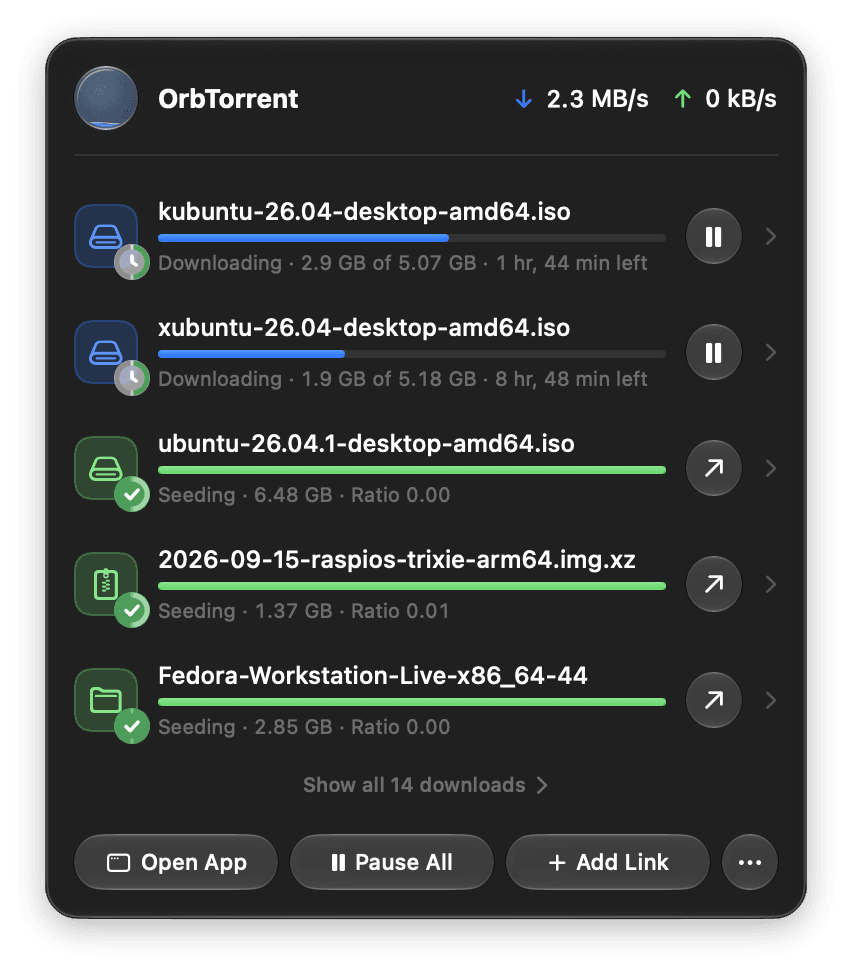
- The menu bar icon is an 18-point template image, so it takes the menu bar's own colour. Its light fills in 40 steps as downloads progress, each drawn once and kept, and it never animates, so it costs nothing while it sits there.
- Where the icon is. SwiftUI doesn't say where a
MenuBarExtra's icon is, and AppKit's windows for it can't be trusted with several displays, as each display's menu bar has its own copy. Accessibility reports where it really is, and an app may always ask it about itself. - Updates wait for you. One that's downloaded installs once OrbTorrent hasn't been used for a minute, and nothing is being imported, checked or moved.
- Reduce Motion holds the orb still.
And what only OrbTorrent does, it does itself, outside the engine. It counts what each unfinished download still needs and pauses downloads before a disk fills. When you drag a download's files into the order you want, it turns that order into the engine's four priorities, as each file finishes. It adds a public list of trackers to public torrents only, never private ones. It reads Transmission's files and qBittorrent's directly to import them. And it keeps the engine on your VPN.
Only through the VPN
libtorrent can be told to use a single network interface for everything, and qBittorrent exposes that as a setting. If that interface goes away, the engine doesn't fall back to another: it has no connection at all. That's the whole of the cut-off. The work is in choosing the right interface, and in never letting the engine run on the wrong one, even for a moment.
Finding the VPN. OrbTorrent reads the Mac's network state from SystemConfiguration: the VPNs set up in System Settings or by VPN apps, and which are connected. That isn't enough on its own. Tunnelblick and wg-quick, for example, can route all traffic through themselves without becoming the Mac's primary connection, so OrbTorrent also listens on a routing socket for routes and addresses coming and going. To see which interface really carries internet traffic, it connects a UDP socket towards a public address and asks which local address the system chose. Connecting a UDP socket sends nothing; it only picks the route.
Binding to it. The interface is written into the engine's settings before it launches, so it never starts on another. With no VPN connected, it's bound to one that can't exist:
/// An interface name that can't exist, for when no VPN is connected: bound
/// to it, the engine has no connection at all.
static let noVPN = "orbtorrent-no-vpn"

// …

/// The interface the engine should use: empty for any.
static func interface(vpnOnly: Bool, connection: VPNMonitor.Connection?) -> String {
    guard vpnOnly else { return "" }
    return connection?.interface ?? noVPN
}
Two details took finding. When the binding narrows, from any connection to the VPN's, the engine keeps the connections to peers it already has, so OrbTorrent drops them and they come back over the VPN. And libtorrent doesn't start the DHT on listening sockets made while it runs, so after the interface or port changes, OrbTorrent turns the DHT off and on again. Without that, a magnet link with no trackers would find no peers until the next launch.
In testing, downloading stopped within 0.2 seconds of one VPN app disconnecting, and within a second with Private Internet Access, through sleep and wake, Wi-Fi dropping and coming back, and a bare wg-quick tunnel with no VPN set up in macOS at all.
The forwarded port
Through a VPN, your router's port forwarding is no use: for other peers to connect to you, the VPN has to forward a port. Behind a shared address, it's the only way to open one at all. Many VPNs do that over NAT-PMP (RFC 6886), and some give you a new port each time you connect, which is what the background scripts are for.
OrbTorrent asks the VPN's gateway itself, on UDP port 5351, the way documented NAT-PMP clients do: first for its public address, then for a mapping, for UDP and TCP. A request is twelve bytes:
static func mappingRequest(_ portProtocol: PortProtocol, internalPort: UInt16 = 0, suggestedPort: UInt16 = 1,
                           lifetime: UInt32 = lifetime) -> [UInt8] {
    [0, portProtocol.rawValue, 0, 0] + bytes(internalPort) + bytes(suggestedPort) + bytes(lifetime)
}
Some gateways pick the port themselves, and others forward the one asked for, so OrbTorrent asks for the port the engine already listens on. Mappings last 60 seconds and are renewed every 45. A renewal that goes unanswered isn't the end: the port stays in use until its mapping runs out, and only then does the engine go back to its own. Where NAT-PMP doesn't answer, OrbTorrent reads the port from Private Internet Access's own command-line tool, or uses one you've reserved in your VPN account, as AirVPN and Windscribe have you do.
Against a WireGuard server with a NAT-PMP gateway, the forwarded port was in use about two seconds after connecting, and a peer outside reached the engine through it.
Holding fakes before they arrive
A fake does its damage once its program is on your Mac, so the check has to come before any of it arrives. The catch is that a magnet link carries no list of files: that comes from peers, as the torrent's metadata. qBittorrent has a stop condition for exactly this moment, so OrbTorrent adds the download running, and has the engine stop it the moment its files are known:
private func apply(_ options: AddOptions, to form: inout MultipartForm) {
    if let savePath = options.savePath { form.add("savepath", savePath) }
    let stopped = options.startImmediately ? "false" : "true"
    form.add("stopped", stopped)
    form.add("paused", stopped) // qBittorrent 4.x name
    form.add("sequentialDownload", options.sequentialDownload ? "true" : "false")
    form.add("firstLastPiecePrio", options.firstAndLastPiecesFirst ? "true" : "false")
    if options.stopsWhenFilesAreKnown { form.add("stopCondition", "MetadataReceived") }
}
The checks then run on the file list. If they pass, OrbTorrent starts the download. If one fails, it's held, and the button reads Download Anyway. A check gets 15 seconds, and one that doesn't finish lets the download start, so a broken extension never blocks downloads.
The Fake Download Check is the first of these checks. It looks only at names and sizes, on your Mac, and sends nothing anywhere. It first works out what a download is from where most of its size is: a film, music or a book, none of which need a program. Then it looks for what fakes share:
- a program disguised as something else, such as a video;
- invisible characters that reverse how part of a name reads, to hide its real extension;
- a film, an album or a book that comes with a program or an installer;
- a video locked in an archive, with the password in a file beside it;
- a film far too small for the quality its name claims, or from a year that hasn't happened;
- video only as
.wmvor.asf, the classic “codec required” fake; - files telling you to download or watch it somewhere else.
It has 61 test cases. More than half are real downloads it has to leave alone, from a 4K remux to a game named with its year, since a check that cries wolf gets turned off.
Extensions in a sandbox
Checks like that one are extensions, written in TypeScript, and anyone can write one. The orb command-line tool bundles each with esbuild into a single script, and OrbTorrent runs it in orb-extension-host, a small helper with JavaScriptCore and two entitlements:
<dict>
	<!-- No file or network access of its own: OrbTorrent answers every request. -->
	<key>com.apple.security.app-sandbox</key>
	<true/>
	<!-- JavaScriptCore runs about 40 times faster with its JIT. -->
	<key>com.apple.security.cs.allow-jit</key>
	<true/>
</dict>
The App Sandbox, with no exceptions, means the helper can't open a file, connect to anything or even look up a host name, and any program it started would be just as stuck. JavaScriptCore's JIT is on only in the helper, never in OrbTorrent.
A fresh helper runs each hook and exits when it returns. It talks to OrbTorrent only through its standard input and output, one JSON message a line. fetch, file fingerprints and storage are all requests that OrbTorrent answers, after checking them against the permissions in the extension's package.json, which you saw before you installed it.
- The network: HTTPS only, to the hosts the extension lists. OrbTorrent looks each host up and refuses one on the Mac or the local network. Then it connects through a relay of its own on
127.0.0.1, which connects to the very address that was checked, so a host can't pass the check and switch to a local address for the connection. TLS still runs from the request to the host, through the relay. - Files: an extension never gets a path. OrbTorrent reads a download's files itself, to fingerprint or upload them, and writes any it's allowed to add, such as subtitles, only next to that download.
- Limits: 15 seconds, 10 seconds of computing and 512 MB before a download starts. After one finishes, up to six hours, for a scan that paces itself for a service's rate limit.
orb test runs the built script in Node's vm module with only the host's few APIs, and answers every request from the test's mocks under the same rules and messages as OrbTorrent, so a test behaves as the app would. The SDK, @orbtorrent/api, is MIT-licensed, and comes with an AGENTS.md and an Agent Skill, so a coding agent can build an extension too. It can't install one, though, or allow a folder of them for development. Only you can, in OrbTorrent's own windows. The security model has the rest.
Signed updates
OrbTorrent updates itself with Sparkle. Once a day it reads a feed from updates.orbtorrent.com. The feed and each update are signed with an EdDSA key, and the app accepts neither without a good signature, checking an update's before it's even unpacked:
SUFeedURL: https://updates.orbtorrent.com/appcast.xml
# …
SURequireSignedFeed: true
SUVerifyUpdateBeforeExtraction: true
SUEnableAutomaticChecks: true
SUScheduledCheckInterval: 86400
# Updates download in the background, and OrbTorrent restarts to
# install them while it isn't in use (see Updates.swift).
SUAutomaticallyUpdate: true
The feed comes from a Cloudflare Worker, which passes it on from Workers KV exactly as it was signed, and counts the request: the version and build in Sparkle's user agent, and a few anonymous counts in the address. Not the IP address it came from.
function count(request: Request, feed: string) {
	const agent = request.headers.get("User-Agent") ?? "";
	const [, app = "other", version = "", build = ""] =
		agent.match(/^(OrbTorrent(?: Dev)?)\/(\S+) \((\d+)\)/) ?? [];
	const params = new URL(request.url).searchParams;
	env.CHECKS.writeDataPoint({
		indexes: [feed],
		blobs: [app, version, build, ...blobs(params)],
		doubles: [1, ...doubles(params)],
	});
}
The counts are your version of macOS, whether your Mac has Apple silicon or Intel, the week OrbTorrent was installed, whether this is its first check ever, this week or this month, and how many times it or its engine quit unexpectedly since the last check. There's no ID: Macs are counted by those first checks. Settings › General › See What's Sent shows exactly what the next check will send, and the counts can be turned off there. Privacy lists them all.
The updates themselves are disk images on GitHub Releases. One script adds a release to the feed, and can mark it critical, so it can't be skipped; phase it in, to a seventh more Macs each day over a week; or withdraw it, which also points the download page and the Homebrew tap back at the version before.
The orb
The orb shows OrbTorrent's state at a glance. It fills as downloads progress, and its colour says what's going on: blue while downloading, amber while waiting for the VPN, grey when paused, green when finished, red when something has failed.

In the app it's SwiftUI: pools of colour on a slowly turning globe, sampled on a grid and drawn as a MeshGradient, masked to a level with a gentle wave on its surface, lit with plus-lighter highlights, inside a clear Liquid Glass circle. A TimelineView redraws it up to 60 times a second.
The website draws the same orb in a single WebGL fragment shader, ported from the app's OrbView layer by layer, with Catmull-Rom smoothing standing in for the mesh gradient's smooth colours. It pauses when it's off screen or in a background tab, and holds still for anyone who has asked for less motion, as the app's does.
What it doesn't do, yet
Some things are left out on purpose. There's no built-in torrent search, for the legal risk and because search plugins need constant upkeep. There are no downloads from RSS feeds, since people who want them use Sonarr and Radarr. And BitTorrent v2 and WebTorrent wait on the engine.
Next are playing a video while it downloads, and an opt-in way to control OrbTorrent from your own network, so phone remotes and Sonarr can use it. The roadmap has the rest, with the requests behind each.
OrbTorrent is free and open source, under the GNU GPL, and the extension SDK is MIT. The source is on GitHub, and Contribute explains how to build it. Questions, bugs and ideas are all welcome there.